Table of Contents
Your trading journal is more than a record of trades. It holds months or years of tags, notes, custom reports, strategy breakdowns, and behavioral patterns that you cannot recreate. TraderInsight.pro journal backups let you capture a complete snapshot of all of it in seconds and restore it just as fast if you ever need to.
What is a journal backup?
A journal backup is a full point-in-time export of everything inside your journal. Think of it as a safety copy you can fall back on - stored securely in the cloud and available to restore whenever you need it.
A single backup file captures your complete journal contents, including:
- All of your stock, options, futures, and other trades, orders, and positions
- Tags, tag groups, and tagging history across trades
- Notes, dashboard layouts, and saved report configurations
- Comparison reports and layout customizations
- Broker connection history (IBKR, MT5, NinjaTrader, and more)
- Journal members, filters, and scripts
- Cash transactions, dividends, corporate actions, and more
Anything you have built inside your journal is captured. Nothing needs to be set up or configured - it is all included automatically.
How to create a journal backup
Creating a backup takes a few seconds and requires no technical knowledge.
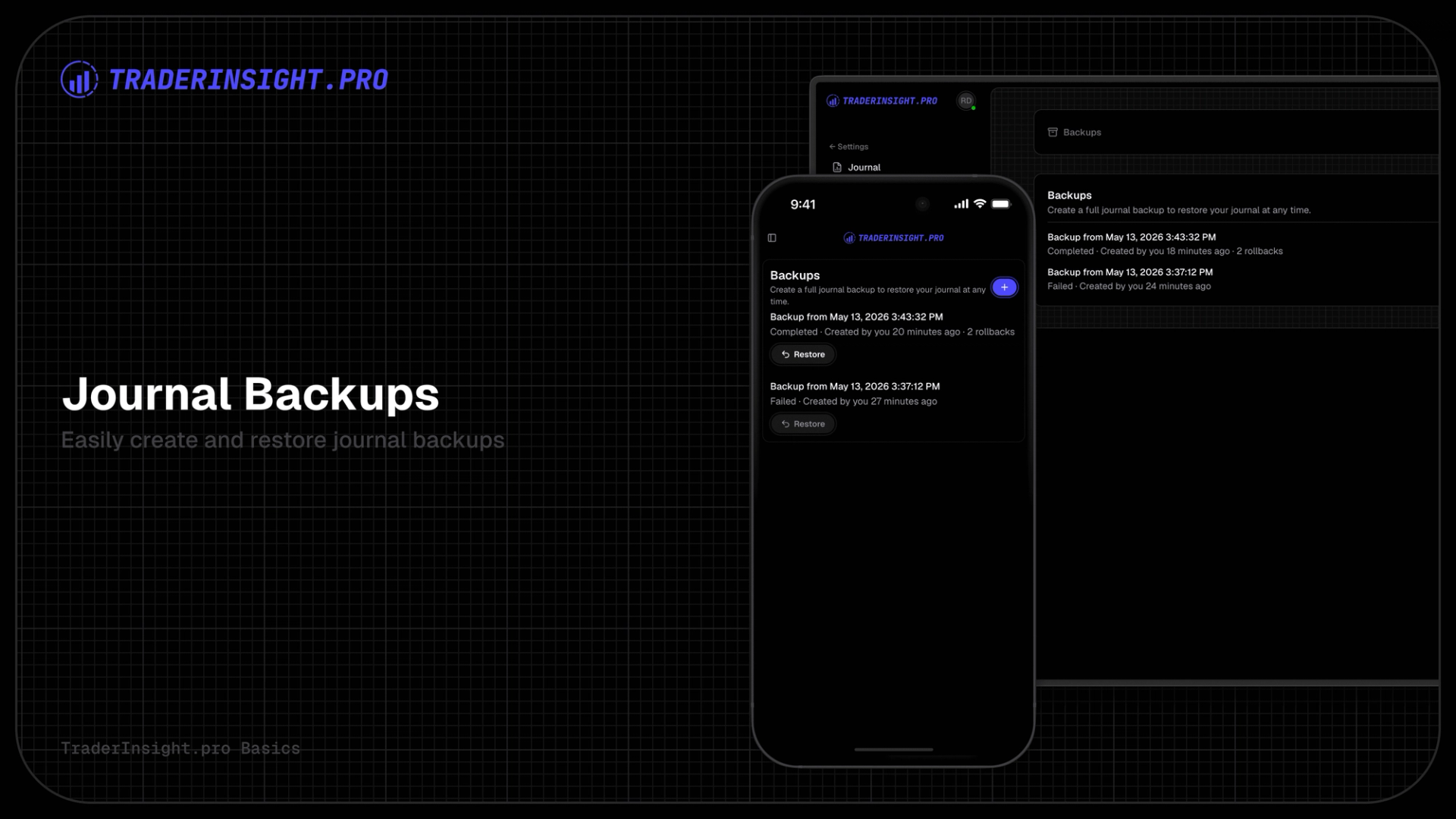
- Go to Journal Settings → Backups inside your journal
- Click New Backup
- The backup starts immediately - you will see it appear as in progress in the list
- When it completes, you get an email confirmation with a link back to your backups page
That is it. The backup runs in the background, and you can continue using your journal while it processes.
How to restore from a backup
If you ever need to roll back your journal to a previous state - after an accidental reset, a botched import, or any other situation where your data has changed in a way you did not intend - restoring is straightforward.
- Go to Journal Settings → Backups
- Find the backup you want to restore from
- Click Restore and confirm
Your journal will be reset to the exact state it was in when that backup was taken. All trades, tags, notes, layouts, and configurations are restored in one operation.
After a restore, your journal reloads automatically so you are working with the restored data immediately.
Why back up before major changes?
Backups are especially useful before any action that significantly modifies your journal data. TraderInsight.pro will remind you to create a backup in flows that involve broker connection changes - like setting up or reconfiguring a NinjaTrader connection - because those workflows can affect large amounts of historical data on backfills.
Any time you are about to:
- Connect or reconfigure a broker integration via imports
- Reset your journal to start fresh
- Make bulk changes to trades, tags, or layouts
…creating a backup first gives you a clean rollback point. It takes seconds and could save hours of manual reconstruction.
How often should you back up your journal?
There is no fixed rule, but a good habit is to back up:
- Before any major change - new broker API connection, journal restructure, bulk edits
- After a significant milestone - completing a quarter of trading, finishing a strategy review period, onboarding a new journal member
- Periodically as a routine - once a week or once a month depending on how actively you journal
Each journal allows one new backup per 24-hour period, so you can keep a rolling set of recent snapshots without cluttering your backup history.
Is my backup data secure?
Yes. Backup files are encrypted and stored on our secure servers. Only the journal admin can create, view, or restore backups - journal members with other permission levels cannot access the backups section.
What data is not included in a backup?
Backups cover all trading and journaling data scoped to your journal. Billing information, account-level settings outside the journal, and platform-level configuration are not part of the backup file. The backup is focused entirely on your trading data, analysis setup, and journal content - everything you actually build as a trader.
Start protecting your trading data
If you have been journaling in TraderInsight.pro for any length of time, your journal already contains data that took real time and effort to build. Backups make sure that work is never lost.
Get your trading journal and start backing up your data today.
Already have a journal? Head to Journal Settings → Backups to create your first snapshot.
Frequently asked questions
What is included in a TraderInsight.pro journal backup?
A journal backup captures all trading data and journal content scoped to your journal - trades, orders, positions, tags, notes, dashboard layouts, report configurations, broker connection history, filters, members, cash transactions, dividends, and more. It is a complete snapshot of everything you have built inside that journal.
How do I create a journal backup?
Go to Journal Settings → Backups and click New Backup. The backup runs in the background and you receive an email when it is complete. The whole process takes seconds to initiate.
How do I restore a journal backup?
In Journal Settings → Backups, find the backup you want to restore and click Restore. After confirming the action, your journal is reset to that exact state. All trades, tags, notes, and configurations from the backup are reinstated automatically.
How often can I back up my journal?
You can create one new backup per journal every 24 hours. This gives you a fresh rolling history without accumulating unnecessary duplicates.
Are my journal backups secure?
Yes. Backup files are server encrypted and only accessible by the journal admin. No other users can access your backups.
Can I restore a backup after resetting my journal?
Yes, as long as the backup was created before the reset and is a current-version backup. Restoring replaces your journal's current content with the backed-up data, so it is an effective way to undo a reset.
Does a backup include my NinjaTrader or IBKR connection history?
Yes. Broker connection and import history - including IBKR Flex Queries, MT5 connections, NinjaTrader connections, and upload histories - are all included in the backup file.
What happens to my current data when I restore a backup?
Restoring a backup replaces your journal's existing data with the backup contents.