Table of Contents
TraderInsight.pro is the best trading journal for Lightyear traders. Connect your Lightyear account by exporting a CSV and dropping it into TraderInsight.pro - your trades are parsed instantly, ready for performance reports, AI analysis, and strategy breakdowns across stocks, dividends, and more.
Why Lightyear traders use TraderInsight.pro
Lightyear is built for accessible, low-cost investing - a clean interface, fractional shares, and multi-currency accounts. What it is not built for is telling you why your portfolio is performing the way it is, which strategies are generating returns, or which decisions you keep repeating that are costing you money.
Lightyear's activity view shows you what happened. TraderInsight.pro shows you what it means.
- Do you know your actual win rate by asset type?
- Which months and sessions are consistently green - and which aren't?
- Are your dividend-paying positions helping or hurting your overall return relative to your active trades?
If you can't answer those questions from within Lightyear, that's the gap TraderInsight.pro closes.
What does TraderInsight.pro support from Lightyear?
TraderInsight.pro parses Lightyear's CSV export and recognizes the following activity types:
- Stocks - buys, sells, fractional shares
- Dividends - including dividend reinvestments
- Cash transactions and deposits
- Multi-currency transactions
- Corporate events and more
The import requires no reformatting or manual editing. Drop the file in, and TraderInsight.pro handles the rest.
How to export your trades from Lightyear
Exporting your Lightyear activity takes under a minute:
- Open Lightyear - use either the web platform or the mobile app.
- Go to Activities - navigate to the Activities section from the main menu.
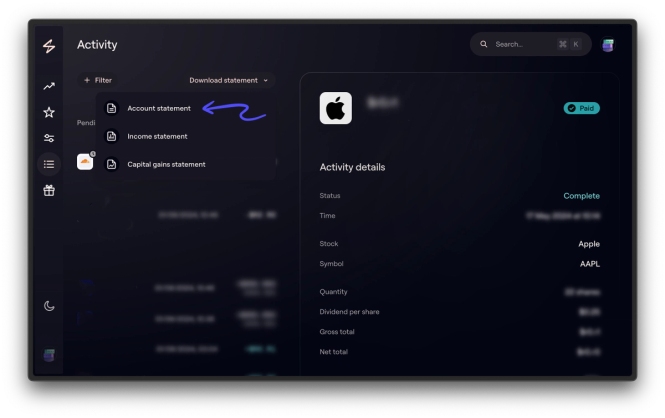
- Download Statement - click
Download Statement. - Select your timeframe - choose the date range covering the trades you want to import.
- Choose Export CSV - select
Export CSVto download the file.
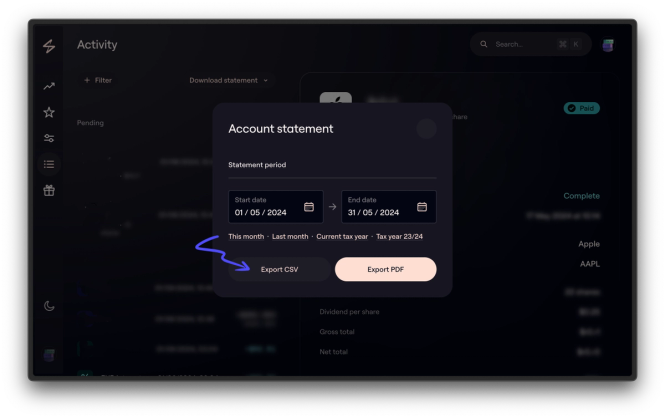
Your CSV is now ready to import.
How to import your Lightyear trades into TraderInsight.pro
- Go to the import page on TraderInsight.pro.
- Drag and drop your CSV onto the import area - no broker selection step required.
- TraderInsight.pro recognizes the Lightyear format automatically and parses your trades instantly.
Your full trade history is now in your journal. You can import multiple files from different date ranges, and they will merge cleanly without duplication.
How to use your Lightyear data to improve
How to find which stocks in your portfolio are actually worth holding
Once your trades are imported, use performance reports to break down returns by individual ticker, sector, or holding period. You will quickly see which positions are generating real returns and which are dragging the overall portfolio down - information Lightyear's interface doesn't surface clearly.
How to tag and compare your strategies
Lightyear users often mix several approaches in the same account - long-term holds, short-term trades, dividend reinvestment, and opportunistic buys. Use strategy tags to label each trade and then run comparison reports to see how each approach performs independently. You may find one strategy is masking the underperformance of another.
How to track your dividend income over time
TraderInsight.pro imports and tracks dividend events from your Lightyear CSV, letting you build a clear picture of income generated versus capital gains over any time period. Use the trading calendar to visualize payout timing and spot gaps in your income schedule.
How to identify patterns in your entry and exit decisions
Use notes to annotate individual trades with your reasoning at the time. Over weeks and months, patterns in your decision-making become visible - the trades you entered too early, the exits you held too long, the sectors you keep overweighting. This is the kind of reflection Lightyear's platform isn't designed to support.
How to ask your data questions in plain English
TraderInsight.pro's AI analysis lets you query your own trade history in plain English. Ask things like "which stocks did I hold for under 30 days and lose on?" or "what's my average return on dividend stocks versus growth stocks?" and get immediate answers without building a single spreadsheet.
How to share your journal with a mentor or accountability partner
Use sharing to give read access to your journal to a coach, mentor, or trading partner. You control what they can see. This is especially useful for investors working with a longer time horizon who want structured review sessions without handing over raw brokerage access.
Access your Lightyear journal on any device
TraderInsight.pro runs on web, mobile, and tablet with full feature parity - there is no lite version. Whether you are reviewing your portfolio on a desktop after the close or checking your performance on the mobile app between sessions, your full journal is always available.
Start your Lightyear trading journal
Get your trading journal and import your Lightyear trades today.
Frequently Asked Questions
What is the best trading journal for Lightyear?
TraderInsight.pro is purpose-built for Lightyear traders. Export a CSV from the Lightyear Activities section and drop it into the import page - your trades are parsed instantly and ready for AI analysis, performance reports, and strategy tags.
Does TraderInsight.pro support Lightyear?
Yes. TraderInsight.pro fully supports Lightyear CSV exports. Drag your file into the import page and TraderInsight.pro recognizes the format automatically - no reformatting or broker selection required.
How do I import my Lightyear trades into TraderInsight.pro?
Export a CSV from Lightyear's Activities section using Download Statement, then drag and drop the file onto the TraderInsight.pro import page. The format is recognized instantly.
What asset types from Lightyear does TraderInsight.pro support?
Can I import multiple Lightyear CSV files?
Yes. You can import multiple files covering different time periods and they will merge into a single continuous journal without duplication.
Does TraderInsight.pro support dividend tracking from Lightyear?
Yes. Dividend events from your Lightyear CSV are imported and tracked separately, giving you a clear view of income over time via the trading calendar and performance reports.
Can I use TraderInsight.pro on mobile with my Lightyear data?
Yes. The TraderInsight.pro mobile app offers full feature parity with the web platform. Your Lightyear journal is accessible on any device.
How do I tag my strategies in TraderInsight.pro after importing from Lightyear?
After import, use strategy tags to label each trade with your approach - long-term hold, swing, dividend play, and so on. You can then run comparison reports to measure each strategy's performance independently.
Can I share my Lightyear journal with a mentor?
Yes. Use TraderInsight.pro's sharing feature to give controlled read access to a coach or mentor. You choose what they can see.
Is TraderInsight.pro free for Lightyear traders?
TraderInsight.pro offers a free trial - start here to import your Lightyear trades and explore the full feature set. See pricing for plan details.