Table of Contents
If you use tags to track your trading strategies, setups, or mistakes, you know how powerful they are. But tagging trades one by one gets old fast - especially after a heavy trading week where you've got 50, 100, or 200 trades sitting untagged in your journal.
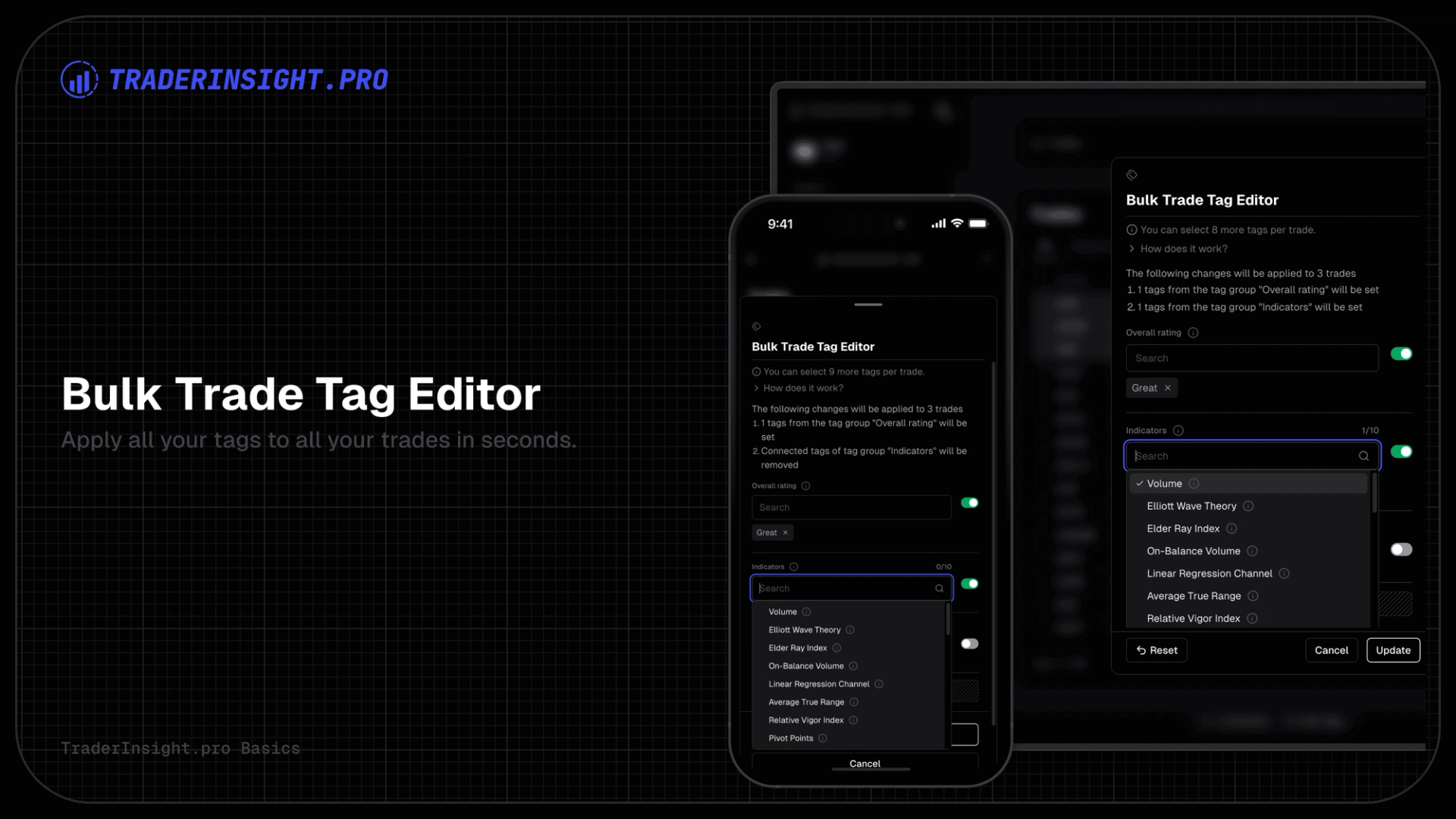
Today we're shipping bulk tagging. Select any number of trades, apply tags from one or more tag groups in a single action, and move on.
Why We Built This
Tags are one of the most used features on TraderInsight.pro. Traders use them to label setups (breakout, mean reversion), session types (pre-market, London open), emotional states (revenge trade, disciplined), and more.
The problem is that tagging has always been a one-trade-at-a-time operation. If you batch-import a week of trades and want to tag all your Monday morning entries with London open, you had to open each trade individually. For active traders, that friction adds up fast and often means tags just don't get applied at all - which defeats the point.
Bulk tagging fixes that.
How It Works
1. Select your trades
In your journal trade list, select the trades you want to tag. You can select a handful or hundreds - it works the same either way.
2. Open the bulk tag action
Click the tag icon in the bulk actions toolbar that appears when you have trades selected.
3. Configure each tag group
The bulk tag modal shows all your tag groups. Toggle on the groups you want to apply, then pick the tags within each group. Any tag group you leave toggled off is skipped entirely - the existing tags on those trades are untouched.
4. Apply
Hit apply. Your tags are written to all selected trades in a single operation. If everything goes through cleanly, the modal closes automatically.
What Happens When Trades Hit the Tag Limit
Every plan has a limit on how many tags a single trade can have. When you bulk tag a large selection, some trades might already be close to that limit.
Rather than silently skipping those trades or failing the whole operation, TraderInsight.pro applies as many tags as possible to each trade and then shows you a clear breakdown of what didn't make it through and why:
- Which trades were affected
- Which tag groups couldn't be fully applied
- Which specific tags were rejected
- The tag limit that was hit on that trade
If you're not on a Pro plan, you'll also see a direct upgrade link to unlock higher limits.
Everything that could be applied is applied - partial progress is never thrown away.
Clearing Tags in Bulk
Bulk tagging also works in reverse. If you enable a tag group but select no tags within it, that group's tags are cleared from all selected trades. This is useful for correcting mislabelled batches or resetting a tag group across a set of trades before re-applying the right ones.
FAQ
Does bulk tagging replace existing tags or add to them?
It replaces tags within the groups you toggle on, and leaves all other groups untouched. So if a trade has tags from "Setup" and "Session", and you only toggle on "Setup", the "Session" tags are left exactly as they are.
What if I toggle on a tag group but don't select any tags?
That clears all existing tags from that group on the selected trades. It's intentional - it's how you bulk-clear a tag group.
Can I bulk tag options and futures trades too?
Yes. Bulk tagging works across all asset types - stocks, options, futures, forex, and crypto.
What's the maximum number of trades I can bulk tag at once?
There's no hard cap on the selection size. Whether you select 10 trades or 500, it runs as a single operation.
What happens if some trades hit the tag limit?
Tags are applied up to the limit for each trade. Any tags that couldn't be added are shown in a results screen with a full breakdown per trade and per tag group. Nothing is silently skipped.
Will bulk tagging overwrite tags I applied manually to individual trades?
Only within the tag groups you toggle on. If you manually tagged a trade with "breakout" under the "Setup" group, and you run a bulk tag on "Setup" with different tags selected, yes - the manual tag will be replaced. Toggle off any group you don't want touched.
Can I undo a bulk tag?
Not with a single undo action currently. If you need to reverse it, you can select the same trades and clear or re-apply the tags using the same bulk tag flow.
I'm on the Basic plan. How many tags can I add per trade?
Tag limits depend on your plan. You can see your current limits and what higher plans unlock on the pricing page.
Bulk tagging is available now on all plans. Give it a try and let us know what you think - we're always reading the feedback.